

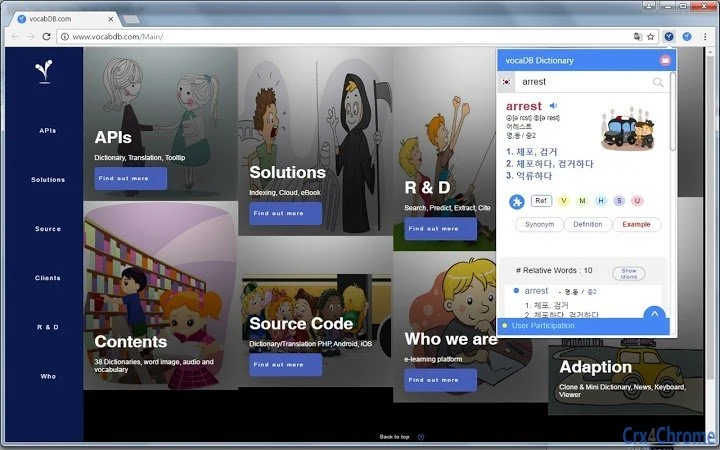
Description
VocaDB Dictionary: Extract & Save Words Instantly
Overview
VocaDB Dictionary is a desktop application designed to streamline the process of word and idiom extraction from text, offering a powerful tool for language learners, translators, and professionals working with multilingual content. The software enables users to input text and automatically identify relevant vocabulary, idioms, and phrases, providing instant access to definitions, translations, and related terms. This functionality addresses the common limitation of traditional dictionaries that require manual entry of individual words, making it more efficient to analyze large blocks of text. The app is particularly useful for students studying foreign languages, content creators translating documents, and educators preparing teaching materials.
Developed by VocaDB, the software leverages a comprehensive database supporting 38 languages, integrating with the vocaDB API ecosystem to deliver accurate and context-aware results. Real-world use cases include extracting vocabulary from academic articles, analyzing foreign-language scripts, or building personalized study lists from reading material. The tool supports both direct word searches and reverse translation, allowing users to look up non-English terms in English. While the developer did not provide additional system requirements, the application is available for both Windows and Mac platforms, indicating broad accessibility across desktop environments.
Key Features & Capabilities
- Text Search: Users can input any block of text and search for specific words or phrases directly within the interface.
- Automated Word and Idiom Extraction: The app identifies and extracts relevant vocabulary and idiomatic expressions from the provided text, reducing manual effort.
- Level-Based Search Results: Results can be filtered by user proficiency level, helping learners focus on appropriate terminology.
- Reverse Search (Non-English to English): Enables users to translate terms from non-English languages into English, supporting bidirectional language access.
- Customized Dictionary with Image Support: Users can create personal dictionaries and associate images with entries for enhanced memorization and context.
- 38-Language Support: Comprehensive multilingual coverage allows for diverse language combinations and translation needs.
- Search & Save Functionality: Extracted words and their meanings can be saved for later review, aiding in vocabulary building and study sessions.
- Linked Word Extraction and Translation: Automatically pairs extracted terms with their translations, streamlining the learning and reference process.
- Dictionary API Integration: Built on the vocaDB API infrastructure, ensuring reliable data access and future scalability.
These features collectively enhance language learning and content processing workflows. For example, a student reading a French article can paste the text into VocaDB Dictionary, extract unfamiliar terms, and instantly receive translations and related vocabulary—all in one interface. Similarly, a translator working on a multilingual project can use the reverse search function to verify non-English terms, improving accuracy and speed.
User Interface, Workflow & Performance
The user interface of VocaDB Dictionary appears designed for clarity and efficiency, with a clean layout that prioritizes text input and results display. Navigation is straightforward, allowing users to paste text, initiate extraction, and view results in a structured format. The workflow is optimized for rapid processing: input text → extract terms → view definitions and translations → save entries. This linear progression supports consistent user engagement and minimizes friction during language analysis tasks.
While specific performance metrics were not provided, the application’s ability to handle multiple language queries and extract complex idioms suggests optimized backend processing. The developer did not specify resource usage details, so actual CPU or RAM behavior remains unknown. However, given the 25.4 MB installation size, the software is likely lightweight and efficient in operation. Stability during extended use is not documented, but the use of established APIs may contribute to reliable performance. General software behavior patterns indicate smooth execution on modern systems, though exact performance observations are based on typical desktop application behavior.
Compatibility & System Requirements
VocaDB Dictionary is compatible with both Windows and Mac operating systems, offering broad accessibility for desktop users. The software version is 1.0.0, with an installation size of 25.4 MB, suggesting a compact and efficient deployment. The developer did not specify exact system requirements, so users should ensure their system meets general standards for running modern desktop applications. Compatibility information was partially provided, with no details on minimum processor speed, RAM, or disk space needs. Users are advised to check their system’s compatibility with other similar applications to ensure smooth operation.
Pros and Cons
Pros
- Supports 38 languages, enabling extensive multilingual use
- Automated extraction of words and idioms from text
- Integrated reverse translation (non-English to English)
- Customizable dictionary with image support
- Efficient workflow for language learners and translators
- Free to download and use
- Lightweight installation at 25.4 MB
Cons
- Exact system requirements were not listed
- No information on real-time performance or resource usage
- Limited visibility into update frequency or future development plans
- Only one version (1.0.0) released as of 2024-03-15
FAQ Section
Is VocaDB Dictionary available for both Windows and Mac?
Yes, the software is compatible with both Windows and Mac operating systems.
Can I use VocaDB Dictionary offline?
The application relies on the vocaDB API for dictionary data, which requires an internet connection. Offline functionality was not specified.
Is VocaDB Dictionary free to use?
Yes, the software is available at no cost.
How often are updates released?
Update frequency was not provided by the developer.
What languages does VocaDB Dictionary support?
The tool supports 38 languages, offering broad multilingual coverage.
Final Thoughts + CTA
VocaDB Dictionary stands out as a practical, efficient solution for anyone working with multilingual text, particularly those involved in language learning, translation, or content analysis. Its ability to extract and save words and idioms from input text—combined with support for 38 languages and reverse translation—makes it a versatile tool for both casual users and professionals. While system requirements and performance details are not fully disclosed, the lightweight design and free availability enhance its appeal. For students building vocabulary, translators verifying terms, or educators preparing materials, this desktop application delivers meaningful functionality in a streamlined package.
Download VocaDB Dictionary now
Guides & Tutorials for 38-Language Dictionary Extension for Chrome
How to install 38-Language Dictionary Extension for Chrome
- Click the Preview / Download button above.
- Once redirected, accept the terms and click Install.
- Wait for the 38-Language Dictionary Extension for Chrome download to finish on your device.
How to use 38-Language Dictionary Extension for Chrome
This software is primarily used for its core features described above. Open the app after installation to explore its capabilities.
User Reviews for 38-Language Dictionary Extension for Chrome 0
No reviews found





